Hello iPhone Duo!

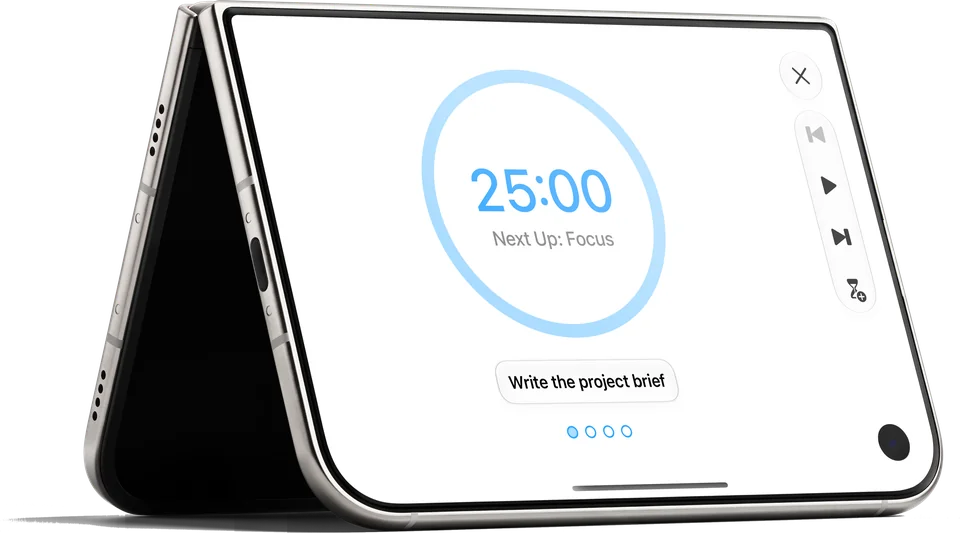
iPhone Duo standing like a tent on its edges, its outer display showing the timer in Focus: 25:00, Next Up: Focus, the task Write the project brief and four dots, with Close, Reset, Start, Finish and Extend in a column beside it
Turn the closed iPhone Duo on its side and the timer will open by itself, its controls in the bar beside the dial.

Focus on iPhone Duo

Focus helps you concentrate with timed focus sessions, track tasks and projects, and see real progress. A coming update will make it at home on iPhone Duo: closed, open, and on its side.

  • iPhone · iPad · Mac · Apple Watch · Apple Vision Pro
  • 22 languages
Focus on iPhone Duo, closed: the Timer just started at 24:59, Focus, the task Prepare Presentation, four dots and the Reset, Pause and Finish buttons, with Extend in the bar at the side Focus on iPhone Duo, closed: the Timer at 14:38, Focus, the task Write first draft, four dots with the first filled, and the Reset, Pause and Finish buttons, with Extend in the bar at the side
Closed, the timer fills the display: the dial, your task, the dots and the controls.

Side by Side

Held wide, your Dashboard and the timer will sit side by side.

Focus on iPhone Duo, open and held wide: on the left the Dashboard with the Activity Summary for Sunday (a ring at 3; Focus 1 h 15 m, Break 15 m, Break 0 m) and a card for Oct 18, 2026; on the right the Timer at 25:00, Next Up: Focus, the task Write first draft, three of four dots filled and the controls below
Open and held wide, the Dashboard sits beside the Timer.
Focus on iPhone Duo, open and held wide: Activity with October on the left (10 Active Days, 38 Focus Sessions, 15 h 50 m Work Time, then each day, Sunday 10/18 with 4 sessions and 1h 40m first) and Today on the right: the week from Sun 18 to Sat 24, the Daily Goal ring at 4, Insights reading You've achieved your daily goal of 4 sessions! Fantastic work today!, and Summary
Activity in two columns: the month beside your day, its Daily Goal and Insights.
Focus on iPhone Duo, open and held wide: All Tasks on the left (Prepare Presentation due Today, Write first draft due Tomorrow, Plan the week due Oct 20, 2026) and the Details of Prepare Presentation on the right: Start Working, the note Slides, speaker notes, one run-through, Due Today, Budget 4 Sessions, Durations and Task Activity
Tasks in two columns: the list beside a task's details, with Start Working at the top.
Focus on iPhone Duo, open and held wide: confetti around the card Time for a Break!, Focus session ended., with the buttons Finish Session, Start Focus, +5 min and Start Break
When a session ends: Start Break, Start Focus, +5 min, or Finish Session.

Made by Humans

Hi, we’re Jan and Kerstin! We’re a married couple in Tübingen, Germany, building our own Apple apps for more than 13 years.

Focus is free to start. Focus Pro unlocks everything with a 7-day free trial.

Join the Beta on TestFlight

Download All Assets ↓

Every screenshot on this page, in one archive — 21 MB.

hello@meaningful-things.com · Press